What do Players Learn?
LINGUISHTIK challenges players to improve their grammar, vocabulary, spelling, and writing skills. Players learn to compose better sentences with proper grammar application. They also use richer vocabulary as they compete against others and are rewarded.
All grade levels play with the same set of procedural rules. However, each division level of competition introduces increasingly more difficult grammatical concepts for the players to use. Competitors are challenged to enhance their vocabulary and grammar skills in increasingly creative ways. Players usually learn more from applying their knowledge in the competition than they do in their normal classroom studies.
Elementary Division (grades 4-6) players concentrate on the six basic parts of speech (noun, pronoun, verb, adjective, adverb, preposition, conjunction, and interjection). They compose sentences ranging from Subject-Verb to Subject-Verb-Indirect Object-Direct Object. They learn to use a host of different functions, such as collective nouns, linking verbs, verbs of different tense. They also learn to incorporate different kinds of phrases and clauses in their sentences.
Middle Division (grades 7-8) players continue to use everything that is available to the Elementary Division. They also add on the ability to add on more complex sentences, such as objective complements, imperatives, and exclamatory sentences. The range of functions they may choose is also expanded to include, for instance, indefinite or relative pronouns, infinitives and participles and gerunds, transitive and intransitive verbs, and many other grammatical ideas.
Junior and Senior Division (grades 9-12) players have all that is available from the lower levels and also may incorporate additional strategies as they construct their sentences. Cases and tenses and complex clauses and phrases become strategies that lead to victories.
How do You Play?
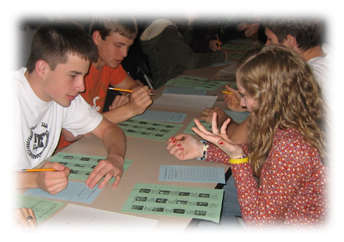
LINGUISHTIK is played with 23 lettered cubes on a two-sectioned mat – Letters or Demands. Each match involves three players from different schools. Many such matches occur simultaneously and last for 35 minutes. Depending upon the time scheduled, two or three such matches can take place on a given day.
Player One shakes and rolls the cubes and orders the letters on the tops of the cubes so that all three players may see them. Player One chooses a sentence pattern or structure. That pattern or structure defines what type of sentence that each player must ultimately compose and write.
Player Two then chooses a part of speech that each player will have to form. Player two may choose from Noun, Pronoun, Verb, Adjective, Adverb, Preposition, Conjunction, or Interjection.
Player Three then stipulates how that part of speech will be used in the sentence (e.g., a noun to be used as the Subject, or an Adjective to be used as a Predicate Adjective or a verb to be linking).
From this point on, each player in turn may play one of the cubes to the mat in either the Letters section or the Demands section.
If the cube is added to the Letters section, the letter on the top of that cube is available to be used in the word to be formed.
If the cube is added to the Demands section, the letter on the top of the cube is Forbidden to be used in the word AND the moving player may add a demand to the word, such as “Must be exactly four letters,” or “the word must be used in an adjective phrase.”
Players continue to add cubes to the mat until one of the players feels there are enough letters available to make the word specified (e.g., the Noun). All players then attempt to form the word and use it in a sentence in the prescribed way. Players may also challenge that the move of the previous player made the construction of such a word to be Impossible. When sentences are created and written, punctuation and the spelling of all words must be correct. An Official Dictionary and Grammar Text are used to settle disputes.
As the play evolves in a single “shake,” a player may have to compose and revise several sentences based upon the moves or demands made by opponents. Authentic learning takes place as the players compose and write in real time.
How Do I Get the Academic Games, Rules and Study Materials?
Check the links to the right to view and print the Official Tournament Rules and/or to obtain the study materials that have been written by experienced coaches over decades.
The LINGUISHTIK Academic Games may be purchased from WFF’N PROOF publishers.
For competitions, each school must bring one LINGUISHTIK game for every three players that will compete.
Academic Games and study materials remain the property of the purchasing school. If cared for, they will last for decades, for practices and competitions. The LINGUISHTIK Academic Games have not changed for decades, much as the basic materials involved in an athletic competition do not change.
The Official Tournament Rules are modified slightly every year based upon suggestions from member Leagues and the National Committee.
Find a board game version at https://boardgamegeek.com/boardgame/14475/linguishtik
Visit http://letterfrequency.org for letter frequencies